

Calling all cricketers! Mick wants to hear from you
March 11, 2025
PGM makes first team visit to Lindum Lodge as Nick becomes its Master
March 12, 2025
Freemasonry is revolutionising the way it keeps records in the digital age by giving members access to a new membership app.
Called simply ‘Portal’, the app promises an easy way for members to manage their own profile, stay informed about Lodge and Chapter meetings, find details of Lodges and Chapters, chart their own masonic journey, and let other members know about their skills and interests.
Support for users will be provided by Provincial Registrar Keith Appleton and Mark French, who already supports Hermes users. Said Mark: “Together we are creating a tool that will significantly enhance the experience of Freemasonry for years to come. The feedback of our members is important. They have a chance to play a pivotal role in the success of this landmark project.”
You’ll get more communications on how to be part of a landmark moment in world Freemasonry. When the invitation lands, you’ll be able to sign up to the platform. Here’s how to do it: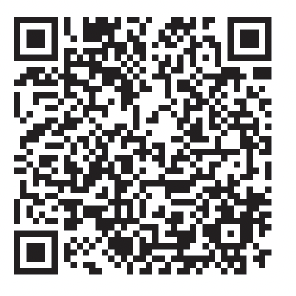
There are two ways to access Portal. From a desktop computer click on this link: desktop.portal.ugle.org.uk, or from your mobile simple scan the QR code on the right using your mobile’s camera.
Here’s how to register:
- Use your email address which is the one that UGLE, your Province and your Lodge/Chapter use to communicate with you.
- Wait to receive a 6-digit verification code which will be emailed to you. (Check your spam folder).
- Paste the code into box and press next
- Enter the following information in full
-
- Your first name and middle name(s) in full
- Your Surname in full
- Date of birth
- Select a Lodge or Chapter in LINCOLNSHIRE that you are a member of (start typing the name or number and select from the list, be careful to choose the right one)
- Press the next button
- If your answers do not match the records, you may be asked additional questions
- You will then be invited to set a password of at least 12 characters, with no requirement for different cases, numbers or special characters, we recommend selecting three short memorable words.
If you have completed the process correctly, you should now have access to Portal, and be able to view your own records.